Meta Ads API: Real-Time Data Access Updates

Meta Ads API: Real-Time Data Access Updates
The latest Meta Ads API data isn’t final data. I recommend saving your API version and query timestamp with each report, then checking attribution settings before using conversion totals to change budgets.
As of October 28, 2026, the sources supplied for this article don’t confirm a new October release or a fixed reporting delay. Polling more often won’t make unfinished results appear.
Here’s what I check before relying on a report:
- Access and queries: Verify permissions, tokens, fields, dates, breakdowns, account time zone, and currency.
- Collection: Retrieve every page, handle rate limits, and retry temporary errors.
- Reporting changes: Check version-specific documentation and save snapshots to track revisions.
- Decision timing: Use recent delivery data for pacing checks. Use settled, reconciled results for CPA, ROAS, and revenue decisions.
My rule: <u>match the age of the data to the decision</u>. A dashboard’s update time tells you when data was collected - not whether attribution is complete.
Meta Ads API: Match Data Timing to Decisions
2. Verified API Changes and Reporting Effects
Review date: October 28, 2026. The supplied official excerpts do not confirm an October 2026 Meta Ads API release, deprecation, or metric change. Check those claims in Meta’s Marketing API documentation and changelog before using them to judge how current or reliable reporting is.[4]
Version, Metric, and Breakdown Changes
Real-time reporting depends on the API version and how fields behave. Verify each change before making decisions with the latest data.
The table separates documented behavior from unverified claims. Missing dates or version details are gaps - not proof of a 2026 rule change.
| Update | Effective date | API surface | Required action | Reporting risk |
|---|---|---|---|---|
| Historical breakdown treatment | April 27, 2021, is the stated historical cutoff.[8] | Insights breakdowns | Check the documented restriction before comparing periods across the cutoff. | Current Insights reads spanning the cutoff may include segments that aren't directly comparable. |
| Breakdown compatibility and metric restrictions[6][8] | Announcement and enforcement dates aren't supplied; check the target version. | Insights metrics and breakdowns | Test combinations. For metrics that require it, explicitly supply action_attribution_windows=1d_click,7d_click,1d_view. |
Unsupported combinations can fail or leave expected segments unavailable in the latest results. |
| Historical ad-account rate-limit policy change[7] | Effective 90 days after v3.3’s release; the excerpt doesn't supply exact calendar dates. | Insights rate limiting | Check the current version-specific limit instead of treating this historical policy as the current limit. | Throttling can delay collection of the latest available data. |
Before migrating, check metric renames, deprecations, redefinitions, attribution changes, and historical backfill against a version-specific allowlist. Test breakdown combinations, and clearly label estimated or in-development metrics.[6][8]
Version checks alone won't resolve timing issues. Collection and attribution delays still affect what appears in Insights.
Notifications and Reporting Delays
Ad Account Webhooks require account-edit access and ads_management. Set up an HTTPS callback and subscribe only to fields confirmed in the current Ad Account webhook reference. A webhook notification can trigger a follow-up query, but it doesn't replace an access token, grant Insights permissions, or mean reporting is final.[3][5]
The supplied sources don't document a universal update interval or attribution-finalization deadline. As implementation guidance - not a Meta guarantee - update today’s data and several prior days using a lookback matched to attribution settings. Save snapshots so you can trace revisions.[8]
sbb-itb-db0d145
3. Set Up Access and Query Insights
Permissions, Tokens, and API Versions
Once you understand reporting timing, limit access to the latest data you can safely query.
Check business portfolio access, the ad-account role or system-user assignment, and the app’s mode and access level. Use ads_read for reporting, ads_management for edits, and business_management only for asset administration. Apps serving external businesses may need Advanced Access and App Review for relevant permissions, depending on Meta’s current requirements.[10][11]
Call a supported, versioned endpoint. Before scheduling reports, validate the token, app assignment, account access, and requested fields. Use user tokens only for setup and a restricted system-user credential for scheduled server-side reporting. Monitor token expiration and revoked permissions - there’s no universal token lifetime to assume.
Once access works, check the query parameters. The wrong settings can delay results or distort the snapshot.
Query Parameters, Dates, and Metrics
Send requests to /v{API_VERSION}/act_{ad_account_id}/insights. Keep queries small, use fixed periods, and request only the fields you need. This makes reports easier to repeat and compare across reporting windows. Conversion figures can still change, so verify the endpoint’s until boundary before production use.
| Parameter | Use | Reporting timeliness | Typical failure |
|---|---|---|---|
level |
Choose account, campaign, ad set, or ad | Finer detail adds processing | Mismatched reporting levels |
fields |
Request needed identifiers and metrics | Fewer fields reduce payload | Unsupported fields |
breakdowns |
Segment results | More segments add rows | Incompatible combinations |
filtering |
Apply supported JSON conditions | Narrows results | Invalid syntax or conditions |
date_preset |
Use rolling periods | Convenient for dashboards | Reruns shift dates |
time_range |
Fix since and until dates |
Enables repeatable comparisons | Reversed dates or assumed boundaries |
time_increment |
Use 1 for daily rows |
Supports pacing checks | Partial-day comparisons |
after / paging metadata |
Retrieve remaining pages | Completes extraction | First-page-only results |
Get the base query working before adding segments. Breakdowns, time zones, and currency all affect how results compare.
Use spend, impressions, reach, and clicks for delivery and cost reporting. Include ctr and cpm only if your API version supports them.
Treat actions and action_values as action-type-specific fields, not single totals. Calculate cost per result with the relevant action count, matching dates, and matching attribution settings. Guard against division by zero, and don’t sum reach across daily rows.
Breakdowns, Time Zones, and Currency
Use publisher_platform for platform, platform_position for placement, age and gender for demographics, country for geography, and supported device_platform values for device analysis.
Add one breakdown at a time and compare the results with the unsegmented report. Incompatible combinations, privacy limits, and sparse segments can keep totals from matching Ads Manager exactly. More breakdowns also mean more rows. Hourly breakdowns don’t support reach or frequency.
Retrieve timezone_name and currency from the ad-account object. Label reports with the account time zone, currency, reporting period, and extraction timestamp. Keep the account’s native currency and local reporting dates, including daylight saving shifts.[6][9]
4. Collect Reliable Data and Guide Ad Decisions
Rate Limits, Retries, and Error Recovery
Once the query works, make sure collection stays complete and repeatable as volume, lag, and errors increase. “Real-time” reporting is only as reliable as the collection process behind it.
Monitor x-fb-ads-insights-throttle, HTTP status codes, and error rates. Queue requests rather than sending them all at once. When requests fail or time out, split large date ranges and high-cardinality breakdowns into smaller queries.
For expensive reports, use asynchronous Insights jobs: submit the job, poll its status, then retrieve every results page. Async jobs still have limits. Retry transient failures with capped exponential backoff and jitter - not continuous requests. Fix permission, invalid-parameter, and unsupported-version errors before retrying.[7][13]
Keep request IDs, account IDs, query parameters, reporting periods, API versions, attribution settings, timestamps, status, and pagination state. Before reporting, check for missing pages, duplicate rows, and unexpected nulls or zeros.
Collection time confirms retrieval, not final completeness. Save snapshots when rerunning recent periods so you can trace attribution changes.
| Symptom | Likely cause | Corrective action |
|---|---|---|
| Missing metrics | Unsupported field, version change, missing permission, or incomplete pagination | Verify fields and permissions, retrieve every page, and compare with Ads Manager. |
| Empty breakdowns | Incompatible combination, insufficient volume, invalid date range, or invalid breakdown | Remove breakdowns, then add them individually; verify dates and compatibility. |
| Permission errors | Expired token, missing permission, or wrong account access or role | Renew the token; check access, permissions, role, and account ID. |
| Delayed conversions | Attribution lag, delayed Pixel or Conversions API events, or delayed CRM imports | Label results provisional, check event delivery, and compare later snapshots before judging CPA or ROAS. |
| Version failures | Deprecated version or removed field | Pin the version, review migration notes, and retest. |
Match Reporting Timing to Each Decision
Once collection is stable, match reporting latency to the decision at hand. Set acceptable latency based on what the business needs - not a promised API update speed.
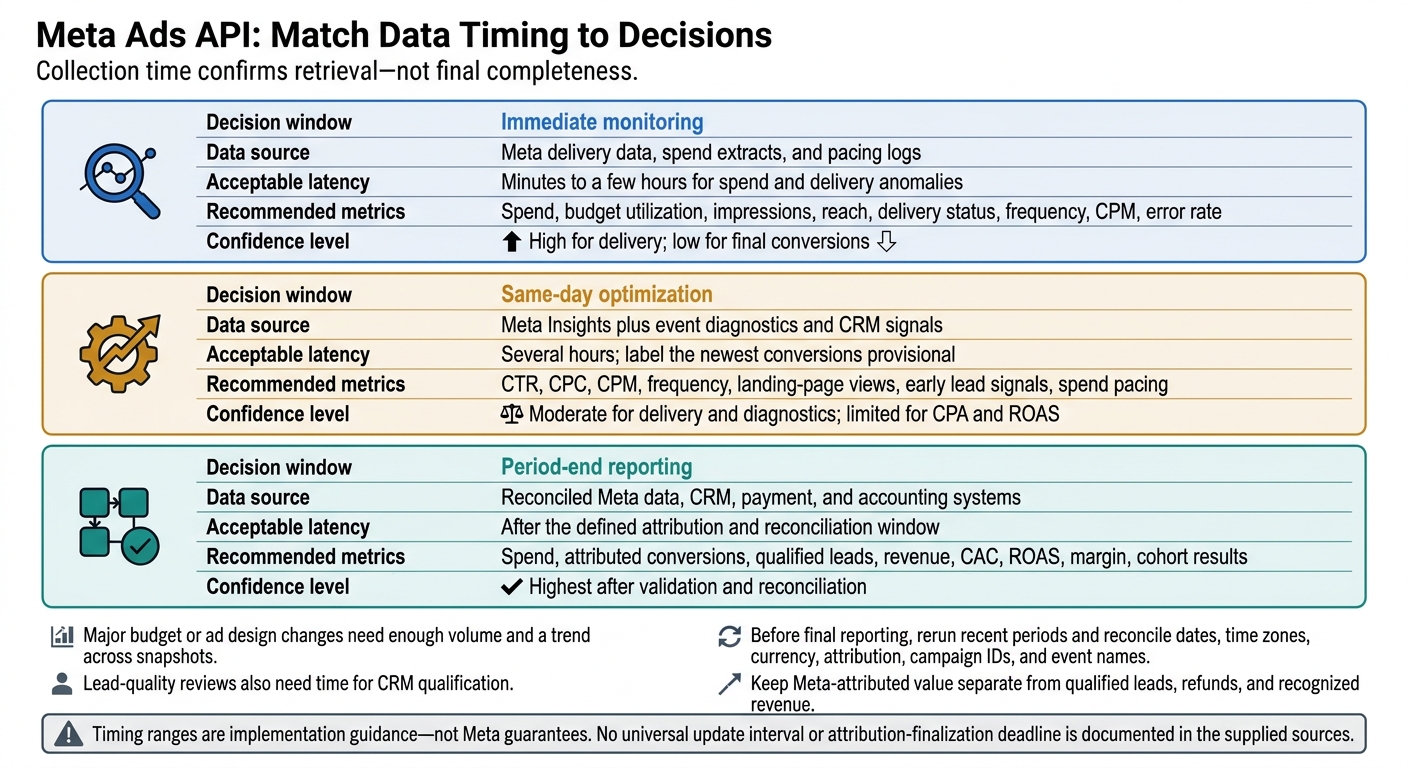
Recent spend data can support pacing alerts. Final ROAS and revenue decisions need mature reporting. Major budget or ad design changes need enough volume and a trend across snapshots. Lead-quality reviews also need time for CRM qualification.
Before final reporting, rerun recent periods and reconcile dates, time zones, currency, attribution, campaign IDs, and event names. Keep Meta-attributed value separate from qualified leads, refunds, and recognized revenue.[12]
| Decision window | Data source | Acceptable latency | Recommended metrics | Confidence level |
|---|---|---|---|---|
| Immediate monitoring | Meta delivery data, spend extracts, and pacing logs | Minutes to a few hours for spend and delivery anomalies | Spend, budget utilization, impressions, reach, delivery status, frequency, CPM, error rate | High for delivery; low for final conversions |
| Same-day optimization | Meta Insights plus event diagnostics and CRM signals | Several hours; label the newest conversions provisional | CTR, CPC, CPM, frequency, landing-page views, early lead signals, spend pacing | Moderate for delivery and diagnostics; limited for CPA and ROAS |
| Period-end reporting | Reconciled Meta data, CRM, payment, and accounting systems | After the defined attribution and reconciliation window | Spend, attributed conversions, qualified leads, revenue, CAC, ROAS, margin, cohort results | Highest after validation and reconciliation |
Use reporting checks to guide decisions, not to force final attribution.
Reporting Support From Dancing Chicken
Dancing Chicken offers Meta Ads audits, strategy, ad design, dashboards, and attribution support. These services help connect reporting checks to campaign decisions - they don't remove Meta’s processing delays.
A useful dashboard should show the reporting-period end, collection time, last reconciliation date, and a provisional-data warning - not just the latest update timestamp.
5. Conclusion: Implementation Checklist
Recent data remains provisional until the reporting window closes.
Use this checklist to put that rule into practice. Assign a named owner for version checks, data validation, and decision timing.
- [ ] Integration maintenance: Assign an owner to review version changes monthly and verify access, fields, breakdowns, pagination, and retry behavior before any upgrade. Keep version-test records covering data freshness, reporting lag, and attribution timing. Name the technical lead who handles unresolved failures.
- [ ] Reporting validation: Assign an owner to check freshness and lag, date boundaries, account metadata, and downstream reconciliation before results are used. Keep validation records documenting data freshness, reporting lag, and attribution timing. Name the reporting lead who handles unresolved discrepancies.
- [ ] Advertising decisions: Assign an owner to enforce a minimum data-age rule before each decision. The rule must distinguish provisional reporting from settled reporting and block action until the minimum age is met. Keep decision records showing data freshness, reporting lag, and attribution timing against the rule. Name the advertising lead who handles blocked decisions.
Dancing Chicken can support implementation and reconciliation.
FAQs
How can I tell when conversion data is stable?
Meta’s reporting isn’t real-time. Conversion data typically takes 24 to 48 hours to appear, and attribution windows and processing times can delay when the numbers settle.
Use the Conversions API alongside your Meta Pixel for consistent event matching and reliable signals. To track data health and stability, check Event Match Quality scores in Events Manager. Regularly compare Meta’s event reports with your internal CRM or backend records, too.
How often should I refresh my Meta Ads reports?
How often you refresh your data depends on your daily ad spend and campaign needs. High-budget advertisers need real-time or hourly updates to maintain performance and make prompt adjustments. Smaller budgets may only need daily updates [1].
For automated dashboards, set auto-refresh to every 30 minutes so decisions reflect current data [2].
How should I set a minimum data age for budget changes?
Give your campaign time to learn before making major changes. Wait until it has run for at least 7 to 10 days, or your ad set has reached at least 50 conversions, before making major budget changes or manual adjustments. This gives Meta’s AI time to learn and stabilize, helping avoid premature learning-phase resets.
Dancing Chicken offers Meta Ads consulting and data-driven plans to help businesses improve performance and grow revenue.