Why Meta Ads ROAS Goals Limit Spending

Why Meta Ads ROAS Goals Limit Spending
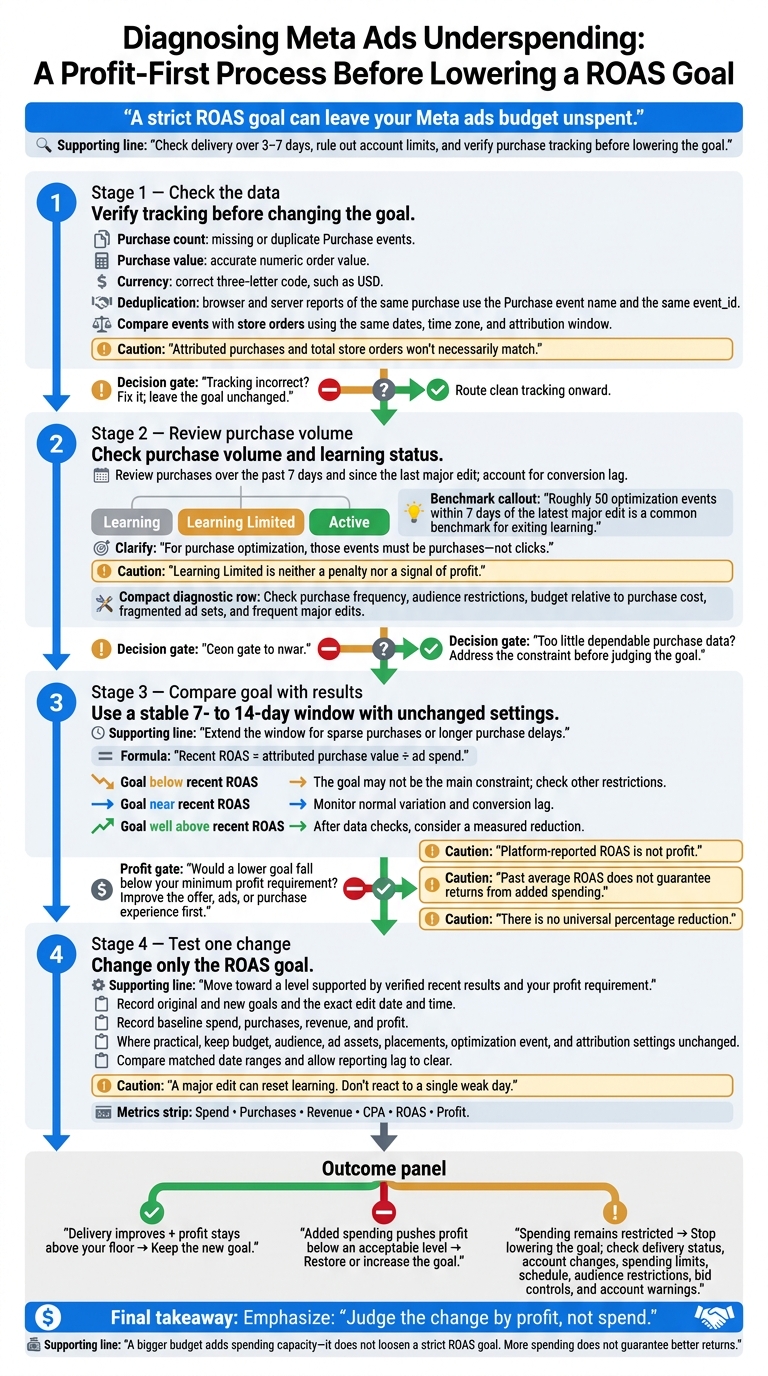
A strict ROAS goal can leave your Meta ads budget unspent. Before lowering it, I’d check delivery over 3–7 days, rule out account limits, and verify purchase tracking. Missing purchases or incorrect revenue can make the goal look harder to reach than it is.
Here’s the order I’d follow:
- Check the data: Verify purchase counts, values, currency, and duplicate events against store orders.
- Review purchase volume: Check learning status and whether Meta has enough purchase data.
- Compare the goal with results: Use a stable 7- to 14-day window, allowing for purchase delays.
- Test one change: Lower only the ROAS goal if recent results and your profit floor support it.
My rule: <u>judge the test by profit, not spending alone</u>. A bigger budget won’t loosen a strict goal, and more spending doesn’t guarantee better returns. If delivery stays low, check other restrictions rather than keep lowering the goal.
Meta Ads ROAS Goals: Diagnose Underspending Before Lowering
Check Purchase Tracking Before Changing the Goal
Bad revenue data can make Meta treat a workable ROAS goal as unreachable. Missing purchases or understated values can skew Meta’s expected returns. Leave the goal unchanged while you check tracking - lowering it won’t fix the signal. If the event data looks correct, compare it with store orders to find the gap.
Verify Purchase Events, Values, and Currency
Open Events Manager and review Purchase events from Pixel and Conversions API.
| Signal | What to verify | Why it matters |
|---|---|---|
| Purchase count | Missing or duplicate Purchase events |
Skews conversion volume |
| Purchase value | Accurate numeric order value | Affects expected returns |
| Currency | Correct three-letter currency code, such as USD |
Prevents incorrect revenue interpretation |
| Deduplication | Matching event names and event IDs for browser and server reports of the same purchase | Prevents duplicate counting |
Compare event_time with the order timestamp, and confirm that Purchase fires only when checkout is complete. Send a numeric value with a valid currency code.
When the browser and server report the same purchase, both should use the Purchase event name and share the same event_id. That tells Meta to count the purchase once.
Compare Ads Manager Data With Store Orders
After checking individual events, compare Meta’s numbers with your store records. Use the same dates, time zone, and attribution window. Ads Manager reports attributed purchases, while store records include all orders, so the totals won’t necessarily match.
Look for unexplained gaps in purchase counts or revenue that could restrict delivery. Account for processing delays, canceled orders, and refunds. Stick to one revenue definition throughout: gross revenue, net revenue, or revenue excluding shipping and tax.
Match order IDs to event records, check that values and currencies agree, and review refunded or test orders. In Events Manager, check diagnostics for missing parameters and delivery errors. Event Match Quality can help you assess matching, but a strong score doesn’t prove purchase values or order counts are correct.
sbb-itb-db0d145
Check Purchase Volume and Learning Status
If tracking is clean, check purchase volume next. Too few purchases can make a strict ROAS goal harder to scale. To fix this, you must scale your revenue and profits with a more effective strategy. Meta lacks the data to predict higher-value orders, so delivery narrows and spend can stall.[4]
Assess Purchase Data and Learning Progress
In Ads Manager, check the ad set’s Delivery status: Learning, Learning Limited, or Active. Review purchases at the ad set level for the past 7 days and since the last major edit. Look at both the total and how purchases are spread across each day. Account for conversion lag: before judging underspending, compare recent results with an earlier seven-day window that has had time to mature.[3][4]
Meta commonly uses roughly 50 optimization events within 7 days of the latest major edit as a benchmark for exiting learning.[3][5] For an ad set optimized for purchases, those events must be purchases - not clicks. Learning Limited means Meta expects too few optimization events to exit learning. It is neither a penalty nor a signal of profit.[3][4][5]
Use these checks to see what may be holding purchase volume back.
Address Limits on Purchase Data
| Data constraint | What to check | Possible action |
|---|---|---|
| Limited purchases | Purchase frequency and conversion lag | Wait for more dependable purchase data before tightening the goal. |
| Small audience | Audience size, exclusions, and geographic restrictions | Broaden eligible reach where it makes business sense. |
| Low budget | Daily budget relative to purchase cost | Check whether the budget can support enough purchases. |
| Fragmented ad sets | Purchases split across similar ad sets | Combine similar ad sets to keep purchase data together. |
| Frequent major edits | Recent changes to targeting, optimization, budget, bids, or ad creative | Cut unnecessary edits and give the ad set time to relearn. |
If purchases remain too sparse, test another optimization event only if it still ties closely to revenue. Use Initiate Checkout or Add to Cart only when the event closely predicts purchases and purchase volume is too low for purchase optimization. This changes the signal Meta optimizes for; it does not guarantee more profitable orders. Measure spend, event volume, purchases, revenue, CPA, and profit separately.[4]
Compare the ROAS Goal With Recent Results
Once tracking and purchase volume look sound, compare your goal with recent ROAS. Use a stable 7- to 14-day window with unchanged settings.[6][8] Extend the window if purchases are sparse or customers take longer to buy.
Check Whether the Goal Exceeds Recent ROAS
Calculate recent ROAS as attributed purchase value divided by ad spend. Compare that figure with your active goal to check whether the goal fits recent performance - not to set a new target automatically. Meta uses the goal to guide auction delivery, but it doesn't guarantee that return.[1]
The gap between your goal and recent ROAS can help you judge whether the goal is too strict.
| Goal versus recent ROAS | Possible interpretation | Recommended response |
|---|---|---|
| Below recent ROAS | The goal may not be the main constraint | Check tracking, purchase volume, learning status, and other delivery restrictions before changing it |
| Near recent ROAS | Normal variation or conversion lag may explain underspending | Monitor delivery and conversion lag before making a major change |
| Well above recent ROAS | The goal may rule out too many opportunities | After checking tracking and data quality, test a measured reduction |
Past average ROAS doesn't guarantee the same return from added spending. More budget may reach more expensive or lower-return opportunities. There's no universal percentage reduction. Base any adjustment on the performance gap and your minimum profit requirement.
Review Profit Needs and Recent Changes
Before blaming the goal, check whether changes to ad content, auction costs, average order value, promotions, or purchase delays explain the gap. A high goal limits eligible auctions because Meta prioritizes impressions it predicts can hit that return.[2] A goal based on required margins may make financial sense while still being too strict for current auction conditions.
Platform-reported ROAS is not profit. Include product costs, fulfillment, payment fees, shipping subsidies, discounts, and refunds when setting your minimum acceptable return. If a lower goal would fall below that threshold, work on the offer, ad content, or purchase experience first. Otherwise, use that profit floor to guide a measured goal-change test.
Test a ROAS Goal Change and Track Results
Change One Major Setting at a Time
If tracking is clean and recent ROAS is below target, test a small goal change rather than a large edit.
Change only the ROAS goal, moving it toward a level supported by recent verified results and your profit requirement. Record the original and new goals, the exact edit date and time, and baseline spend, purchases, revenue, and profit. Where practical, leave budget, audience, ad assets, placements, optimization event, and attribution settings unchanged.
A major edit can reset learning. Compare matched date ranges and allow reporting lag to clear before judging results.[7][6][12] Don’t keep editing the goal in response to a single weak day.
Measure Spend, Revenue, and Profit Together
Judge the change by results, not spend alone. Track spend, purchases, revenue, CPA, ROAS, and profit together. Use verified store orders where possible to check whether the lower goal allows more spending while meeting your profit requirement. Higher attributed revenue alone doesn’t prove incrementality.[6]
Keep the new goal only if delivery improves and profit stays above your floor. Restore or increase it if the added spending pushes profit below an acceptable level. If spending remains restricted, stop lowering the goal. Check the Delivery column, recent account changes, spending limits, schedule, audience restrictions, bid controls, and account warnings.[9][10][11]
Consider an Audit if Underspending Continues
If underspending continues, get an account audit to check tracking, delivery limits, and whether the goal fits your account. An audit cannot guarantee a spending level, ROAS, or recovery date.
If the test still underdelivers after these checks, the problem likely extends beyond the goal itself.
Conclusion: Fix Tracking Before Lowering the Goal
Fix tracking before lowering the goal. Next, check purchase volume, compare the goal with recent ROAS, and test one change at a time.
A bigger budget doesn’t loosen a strict ROAS goal. It adds spending capacity - not more auctions predicted to meet the target. Meta’s goal guides delivery; it doesn’t guarantee a return.[1]
Extra spending only pays off if the added purchases leave enough profit after ad costs, product costs, fulfillment, discounts, and refunds. Judge the change by profit, not spend.
FAQs
How do I calculate my minimum profitable ROAS?
Calculate your break-even ROAS by dividing 1 by your profit margin, expressed as a decimal. For example, a 30% profit margin gives you a break-even ROAS of 3.33 (1 ÷ 0.30).
That’s the return you need to cover costs without taking a loss. To turn a profit, set benchmarks above break-even and account for shipping, returns, and overhead. Use consistent revenue and cost data to keep your calculations accurate.
How can I tell if my ROAS test is conclusive?
Run your test for two to four weeks to cover full customer cycles. Leave the most recent seven days out of your analysis to allow for attribution delays. Focus on trends, not day-to-day swings.
Check that both the Meta Pixel and Conversions API work correctly to reduce tracking gaps. Compare Meta’s reported ROAS with incremental lift or your internal backend metrics to see whether Meta is taking too much credit for results.
Can a lower ROAS still mean higher profits?
Yes, a lower ROAS can still mean higher profits. High ROAS shows that ads generate revenue efficiently, but it doesn’t guarantee profit.
High-margin products or strong customer lifetime value (CLV) can make a lower initial ROAS profitable over time. On the flip side, thin margins or high operating costs can eat into profits - even when ROAS is high.
Use profit on ad spend (POAS) or break-even ROAS to guide spending decisions beyond revenue alone.