Meta Ads Bid Caps vs. Cost Per Result Goals

Meta Ads Bid Caps vs. Cost Per Result Goals
Bid Cap limits Meta’s auction bid. Cost Per Result Goal targets an average cost per result. Neither guarantees a fixed CPA or full budget spending. Start with Meta ads that actually work by reviewing recent performance and the cost a business can afford - not its lowest desired CPA.
On a limited budget, setting either control too low can leave money unspent and reduce results. The choice comes down to auction control versus room to bid around an average target.
Quick Comparison
| Comparison | Bid Cap | Cost Per Result Goal |
|---|---|---|
| Controls | Maximum auction bid | Target average cost per result |
| Best suited to | Advertisers with reliable bid and conversion data | Advertisers with stable conversion history |
| Main risk | Too few auction wins | Too little delivery if the goal is too low |
| What to track | Spend pace, delivery, and result volume | Weekly average cost and result volume |
Test one change at a time, check tracking and delivery before loosening limits, and allow at least 7 days after a goal adjustment before reviewing weekly averages. Judge both options by qualified results, customer acquisition cost, and profit - not CPA alone.
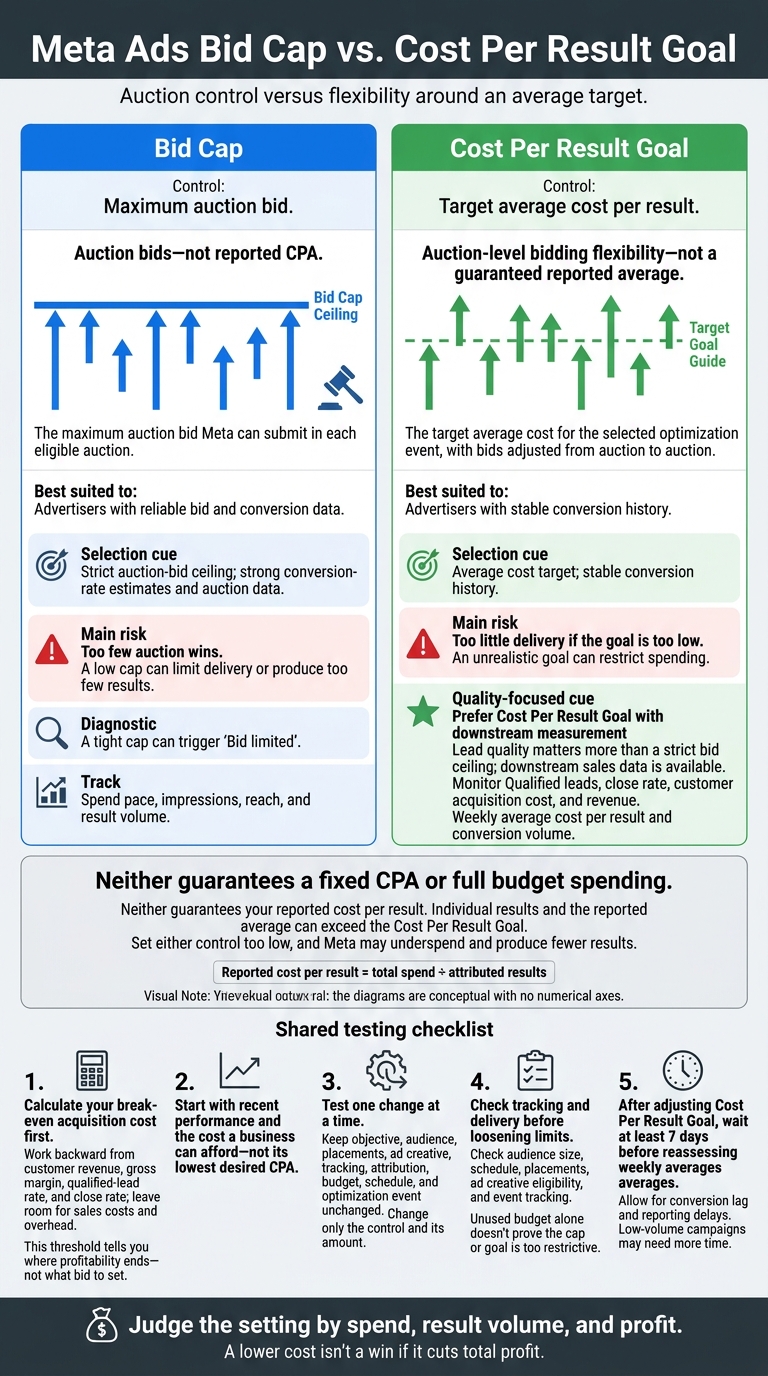
Meta Ads Bid Cap vs. Cost Per Result Goal
How Meta Ads Bidding Controls Work
Reported cost per result is total spend divided by attributed results. In Ads Manager, the controls you can use depend on your campaign objective, performance goal, budget setup, and account settings.[1]
| Control | What it regulates | What it does not guarantee |
|---|---|---|
| Bid Cap | The maximum auction bid Meta can submit in each eligible auction. | A matching reported cost per result, full budget spending, or a specific result volume. |
| Cost Per Result Goal | The target average cost for the selected optimization event, with bids adjusted from auction to auction. | Every result meeting the goal, the reported average matching the goal, or full budget spending. |
These mechanics matter most with a fixed budget, where small bid changes affect both delivery and result volume.
Bid Cap Sets an Auction Bid Ceiling
Meta uses predicted action rates to set impression-level bids. That means a tight cap can reduce auction wins without lowering reported cost per result. Meta may also bid below the ceiling to help pace budget spending.[2][5]
Your preferred CPA alone isn't enough to choose a cap. Review conversion rates, placements, and delivery history to see how bids translate into results. A tight cap can trigger “Bid limited”; use that status to diagnose weak delivery before increasing the cap.[4]
Cost Per Result Goal Targets Average Cost
Meta can bid above or below the goal in individual auctions while working toward the target average. But the goal isn't a hard spending limit: individual results and the reported average can exceed it. Delivery can also slow when suitable opportunities are scarce. Judge performance using weekly averages rather than a single day.[3]
This bidding flexibility changes pacing and result volume when budgets are tight.
sbb-itb-db0d145
How Limited Budgets Affect Spending and Results
Budget Pacing vs. Bidding Restrictions
Budget pacing controls when Meta spends; bid controls determine which auctions it enters. On a limited budget, a tight Bid Cap can slow delivery or leave money unspent. A Cost Per Result Goal gives Meta more flexibility, but it can still underspend when too few auctions meet its criteria.[6][7]
If spending falls short, check audience size, schedule, placements, ad creative eligibility, and event tracking - not just the bidding setting. Unused budget alone doesn't prove the cap or goal is too restrictive.[9][10] Comparing auction control with result volume helps put that trade-off in context.
Auction Control vs. Result Volume
When conversions are low, just one more result can sharply change the reported average. Meta also has fewer conversion signals to guide delivery.
Look at spend, impressions, clicks, conversion rate, conversion count, and delivery stability together - not cost per result alone. Test lower cost settings against budget and delivery data to see whether they still bring in enough qualified results to justify the spend.
How to Choose and Test a Bidding Control
Match Your Bidding Control to Your Priority
Choose a control based on your budget, the depth of your data, and your profit target.
Calculate your break-even acquisition cost first. Work backward from customer revenue, gross margin, qualified-lead rate, and close rate to find what you can afford to pay for an acquisition. Leave room for sales costs and overhead. This threshold tells you where profitability ends - not what bid to set.
| Priority and data readiness | Control to consider | Main risk | Metric to monitor |
|---|---|---|---|
| Strict auction-bid ceiling; strong conversion-rate estimates and auction data | Bid Cap | A low cap can limit delivery or produce too few results | Spend pace, impressions, reach, and result volume |
| Average cost target; stable conversion history | Cost Per Result Goal | An unrealistic goal can restrict spending | Weekly average cost per result and conversion volume |
| Lead quality matters more than a strict bid ceiling; downstream sales data is available | Prefer Cost Per Result Goal with downstream measurement | Cheap results may be low quality or produce no revenue | Qualified leads, close rate, customer acquisition cost, and revenue |
Bid Cap needs a bid estimate backed by data. Cost Per Result Goal gives Meta more room to work around an average target. Neither guarantees your reported cost per result.
Once you choose a control, test it while keeping the rest of your setup consistent.
Test Within Your Budget
Keep your objective, audience, placements, ad creative, tracking, attribution, budget, schedule, and optimization event unchanged. Change only the control and its amount. Equal budgets don’t make the controls equivalent: one caps bids, while the other targets an average cost.
Use Meta’s controlled split testing with equal budgets only if both versions can generate enough results for a useful comparison. Otherwise, test them sequentially and record the dates and auction conditions. That comparison will be less controlled.
Allow for conversion lag and reporting delays. After adjusting Cost Per Result Goal, wait at least seven days before reassessing weekly averages.[3] Low-volume campaigns may need more time.
Track Delivery and Adjust Settings
Use delivery data to check whether the control is helping or blocking spend.
Review spending pace, delivery status, reported cost per result, conversion count, qualified leads, close rate, and revenue together. If delivery stalls, check audience size, ad creative, tracking, and setup before loosening the control. Reassess your settings when auction costs, conversion rates, margins, or close rates change.
Conclusion: Balance Cost and Result Volume
With a limited budget, the difference comes down to delivery. Set either control too low, and Meta may underspend and produce fewer results.[6][9][11]
Choose Bid Cap for strict auction control supported by reliable data. Choose Cost Per Result Goal for more flexible control over average costs.[6]
Judge the setting by spend, result volume, and profit. A lower cost isn't a win if it cuts total profit.[8][11]
FAQs
How do I set an initial Bid Cap from past results?
Check the past 3–6 months in Meta Ads Manager to find your average cost per acquisition (CPA) or cost per result. If you’re switching from Highest Volume, use that period’s average CPA as your starting point.
Bid Cap sets a strict manual limit, so start with a higher cap during the learning phase. This gives you room to collect enough data before lowering it. Aim to protect your profit margins while keeping your ads delivering.
When should I switch bidding controls?
Start new campaigns with Highest Volume bidding to set a baseline. Once you’ve collected enough performance data - typically 50 to 100 conversions - consider switching to a different bidding option.
Use Cost Cap or Target Cost to keep acquisition costs consistent, Minimum ROAS to focus on profitability, or Bid Cap for precise control over individual auction bids.
Avoid frequent changes during the learning phase. They can disrupt learning and hurt results.
How can I tell if underspending is hurting profit?
Judge total profit, not spend alone. Start by checking your tracking. Missing purchase events or incorrect revenue data can make a bid or ROAS goal look out of reach.
Compare returns over a stable 7–14-day window, allowing time for delayed conversions. Measure those returns against your minimum profit floor, accounting for product costs, fees, and shipping. If profit stays above that floor but delivery stalls, your bid or goal may be too strict - and could be shutting out profitable opportunities.