Meta Lead Ads: CRM Field Mapping for Source Tracking

Meta Lead Ads: CRM Field Mapping for Source Tracking
To connect Meta leads to revenue, store the lead ID and available campaign, ad set, ad, and form IDs in separate CRM fields. Use the lead ID to prevent duplicate submissions and campaign, ad set, or ad IDs to link sales results to ad spend - not names or form IDs.
The setup comes down to three steps:
- Map the fields: Retrieve the lead after the webhook notification, map contact details and answers, and preserve each submission’s source history. Leave unavailable IDs empty.
- Test the path: Send one test lead through retrieval and CRM storage. Check retries, missing fields, and submission counts, then retest when forms or mappings change.
- Connect sales to spend: Apply consistent reporting dates and attribution rules to measure qualified leads, customers, and ROAS. For example, $3,000.00 in attributed revenue ÷ $1,000.00 in spend equals 3× ROAS.
Keep CRM reporting separate from sales events sent to Meta. The CRM remains the source of truth for lead status and revenue.
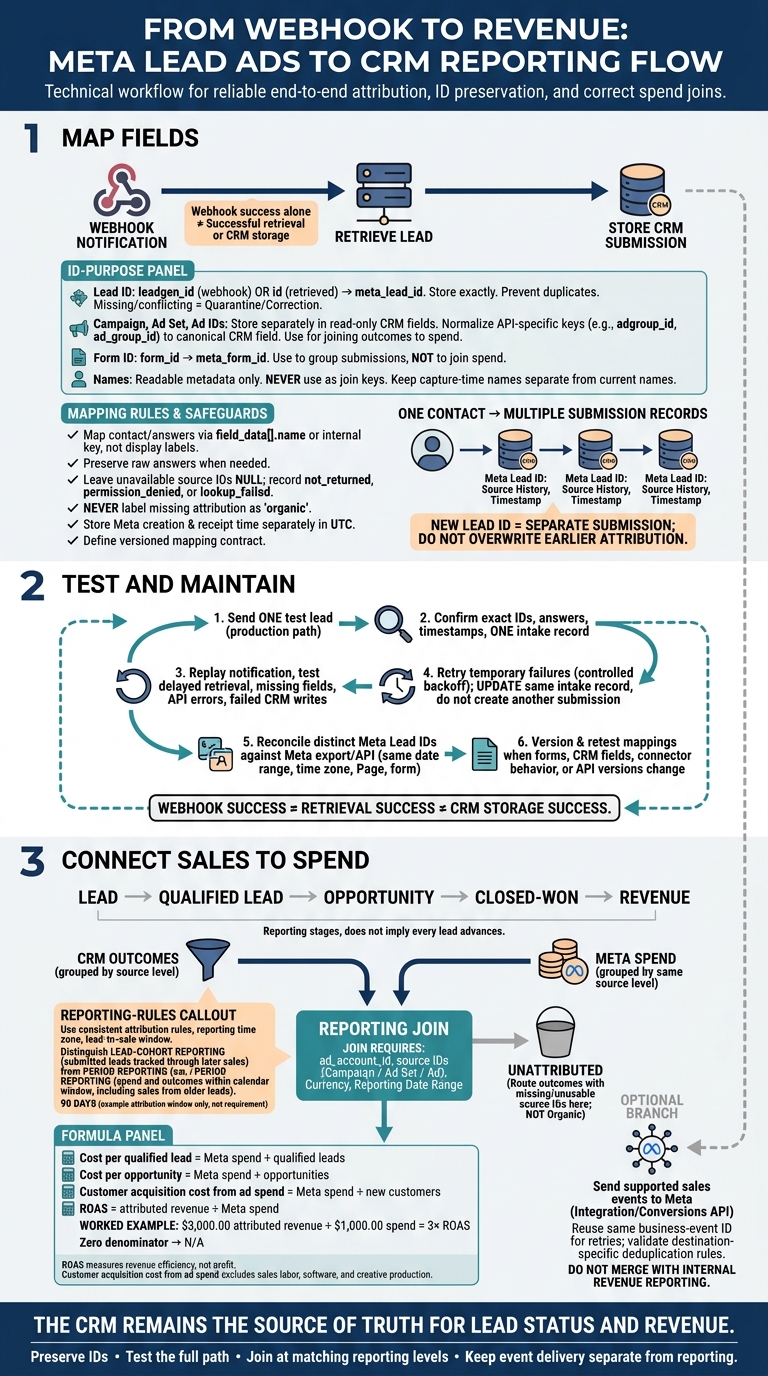
Meta Lead Ads to CRM: Source Tracking Workflow
Step 1: Map Lead Details and Source IDs
Before production, define a versioned mapping contract for contact data, form answers, and Meta source IDs. For every field, document its source key, CRM destination field, data type, transformation rule, null behavior, owner, and edit permissions.
This contract connects CRM records to Meta spend and revenue. It also keeps attribution intact from form submission to CRM record.
Map Contact Details and Form Answers
Map answers using the returned field_data[].name or internal question key - not the display label. Different forms can collect different fields, and answers can arrive as arrays. Convert custom answers only when the contract defines their type and meaning.
| Meta source field | CRM destination field | Data type | Transformation | Fallback behavior |
|---|---|---|---|---|
field_data[].name = full_name |
contact_full_name |
Text | Trim whitespace; preserve submitted text | Null if absent; retain the original key in audit data |
field_data[].name = email |
email |
Email/text | Trim, apply the documented case policy, and validate format | Null; flag email_missing_or_invalid |
field_data[].name = phone_number or equivalent returned key |
phone |
Text | Normalize only when country context is known; never assume +1 |
Use the normalized value if valid; otherwise retain the raw value and flag it |
| Custom question key | Matching qualification field or answer record | Text, number, Boolean, or date | Convert according to the field contract; preserve the original key and submitted value | Null if absent from this form; store unmapped answers in a review field |
leadgen_id from the webhook or retrieved lead id |
meta_lead_id |
Text | Store exactly as received; link the submission record | Quarantine the record if the ID is missing or the values conflict |
page_id, campaign_id, adgroup_id or ad_group_id, ad_id, and form_id |
Separate meta_*_id fields |
Text | Preserve exactly; map API-specific ad set keys to one canonical CRM field | Null with a diagnostic status: not_returned, permission_denied, or lookup_failed; never substitute a name for an ID |
Retrieved created_time |
meta_lead_created_at |
UTC datetime | Parse into UTC | Null with a warning; never substitute receipt time |
Store Meta Lead and Source IDs
Use Meta IDs as join keys for spend and revenue reporting. Store each ID in its own read-only CRM field, alongside a readable name field. Record where each ID came from in audit logs. Check API-specific ad set keys rather than assuming similarly named fields mean the same thing.
Make source timestamps and capture-time names read-only for sales users, too. For authorized corrections, log the old value, new value, actor, time, and reason.
When an existing contact submits another form, create a separate submission record linked to that contact. Don't overwrite earlier attribution. Use email or phone as secondary contact-matching keys while preserving each submission’s Meta lead identifier.
Add Source Metadata and Handle Missing Values
Use authorized lookups to fill in available campaign, ad set, ad, and form names without overwriting IDs. Store capture-time names separately from current names, and record each lookup’s time and status.
If a name lookup fails, keep the ID. That’s what links CRM outcomes to ad spend. Missing optional metadata shouldn't block an otherwise valid lead.
Store Meta creation time and receipt time separately in UTC, and display both in U.S. local time for users.
Once the mapping contract is stable, test one real submission against it.
sbb-itb-db0d145
Step 2: Test Delivery and Maintain Field Mappings
Check a Test Lead in the CRM
Use the Step 1 mapping contract to confirm that source IDs, form IDs, and answers reach the CRM unchanged. These checks protect the source keys that connect CRM outcomes to Meta spend.
Submit a clearly labeled test lead through Meta’s Lead Ads Testing Tool. Use the same form and integration path as production, then follow the lead through notification, retrieval, and CRM storage. A successful webhook does not prove that retrieval or CRM storage worked.
| Expected Meta value | Resulting CRM field | Validation result | Action when absent |
|---|---|---|---|
leadgen_id or retrieved id |
meta_lead_id |
Exact match; one intake record | Hold the record for retry; do not create a second submission |
| Submitted form ID | meta_form_id |
Matches the tested form | Route to an unmapped-form queue |
| Ad, ad set, and campaign IDs | Corresponding source attribution fields | Exact match when supplied | Leave null and mark attribution unavailable |
| Submitted contact details and custom answers | Mapped contact and answer fields | Match the expected normalization and data types | Keep the raw answer and log the gap |
Retrieved created_time |
meta_lead_created_at |
Matches within the agreed time-zone conversion | Preserve the raw timestamp and flag for review |
Check ad-level attribution separately using a real submission or an API/export comparison.
Test Retries and Reconcile Submission Counts
Once the first test passes, test how the integration handles retries and reconciles records.
Replay a notification and delay retrieval. Test invalid answers, missing ad IDs, API errors, and failed CRM writes. Recovery should update the same intake record, not create another one. Retry temporary failures with controlled backoff, and route invalid mappings and permission failures for correction. A repeat submission with a new lead ID may link to an existing contact, but it must keep its own source history.
On a set schedule, reconcile distinct Meta Lead IDs in the CRM against a Meta export or API pull. Before comparing totals, match the created-date range, time zone, Page, and form. Investigate missing IDs, duplicate intake records, and delayed arrivals. Save the reconciliation window, result, and owner.
Monitor Errors and Track Mapping Changes
Once the test path works, watch for the same failures in live traffic.
Assign an integration owner for failures, a CRM owner for destination fields, and a marketing owner for form changes. Monitor retrieval latency, failed writes, retries, permission errors, unmapped questions, duplicates, and missing attribution.
Version and retest mappings whenever forms, CRM fields, connector behavior, or API versions change. Store the mapping version with each submission. Keep source IDs unchanged and handle name updates separately.
Restrict access to raw payloads and personal data by role, and apply the retention policy. Keep credentials out of logs.
Step 3: Link CRM Sales Outcomes to Meta Spend
Once Meta IDs are stored in the CRM, use those fields to connect revenue to ad spend.
Join Spend and Sales Data by Source ID
Group spend and CRM outcomes at the same reporting level before joining them: campaign, ad set, or ad. Join on ad_account_id, the source IDs for that level, currency, and the reporting date range. Never use campaign names as join keys. Use form IDs to group submissions, not to join spend. Put outcomes with missing or unusable source IDs in an unattributed bucket.
Use lead-cohort reporting to track submitted leads through later sales. Use period reporting to show spend and outcomes within a calendar window, including sales from older leads.
Document the attribution rule, reporting time zone, and lead-to-sale window, such as 90 days. Decide whether to credit revenue once per person, once per opportunity, or across all opportunities. Label reports clearly: revenue recorded during a period is not necessarily revenue from leads submitted during that period.
Apply these same join rules to stage metrics and revenue reporting.
Calculate Lead Costs and Revenue Metrics
Choose one definition and one CRM field for each stage. Keep stage dates separate, and label each as first entry, latest entry, or conversion date. The metrics below use stored campaign, ad set, and ad IDs; form IDs group submissions.
| Stage | Stage definition | Required CRM fields | Source IDs | Reporting metric |
|---|---|---|---|---|
| Lead | Valid Meta form submission, excluding test or duplicate records | Meta lead ID, submission timestamp, contact ID | Form ID, campaign ID, ad set ID, ad ID | Lead volume |
| Qualified lead | Meets the agreed qualification criteria | Qualification status, qualification date, reason code | Campaign ID, ad set ID, ad ID | Qualified-lead rate |
| Opportunity | Sales opportunity created under the agreed threshold or process | Opportunity ID, creation date, expected value | Stored Meta source IDs | Opportunity volume and rate |
| Closed-won | Opportunity reaches the approved won stage | Won date, opportunity ID, customer ID | Stored Meta source IDs | Customer count |
| Revenue | Approved realized or contract revenue definition | Revenue amount, currency, booking or collection date, refunds | Stored Meta source IDs | Revenue and ROAS |
Calculate costs and revenue efficiency with these formulas:
- Cost per qualified lead = Meta spend ÷ qualified leads
- Cost per opportunity = Meta spend ÷ opportunities
- Customer acquisition cost from ad spend = Meta spend ÷ new customers
- ROAS = attributed revenue ÷ Meta spend
Keep the account, source level, cohort or period, and attribution scope consistent. Show N/A when the denominator is zero.
Customer acquisition cost from ad spend excludes other acquisition costs, such as sales labor, software, and creative production. ROAS measures revenue efficiency - not profit. Format dollar amounts as $1,500.00, and document source currencies, the exchange-rate source, rate date, and conversion method.
If the CRM also sends sales events to Meta, keep that workflow separate from internal revenue reporting.
Send Supported Sales Events to Meta
A CRM integration or Conversions API setup may send qualification or downstream sales events to Meta. Keep event transmission separate from CRM reporting.
Before turning it on, verify the target Meta destination, account permissions, access tokens, event names, required parameters, customer-data handling, privacy and consent requirements, and matching identifiers.
Use the same business-event ID for every retry, and check the workflow’s deduplication rules. Redundant browser and server events commonly need matching event_name and event_id values.[5][7]
Store transmission status, response details, event timestamp, event name, and CRM record ID. Set up retries with backoff, an error table or dead-letter queue, and periodic checks that compare CRM event counts with Meta-received counts.
The CRM remains the source of truth for lead status, pipeline, revenue, and finance-approved outcomes. Keep CRM reporting and Meta event delivery separate, and reconcile both systems. Expect differences caused by attribution windows, matching rates, time zones, deduplication logic, privacy restrictions, and reporting delays. Sending events to Meta does not guarantee attribution or better ad performance.[6][4]
Conclusion: Source Tracking Checklist
Before go-live, send one test lead through the full path: webhook, lead retrieval, CRM write, and ID retention.
Check optional answers and missing metadata. Leave unavailable IDs empty and mark them as missing. Never label missing attribution as “organic.” Save unmapped answers in a notes or raw-payload field so form changes don’t silently drop data.
Replay a notification to check deduplication and retry handling. Then reconcile Meta submissions against retrieved, duplicate, rejected, and retry-pending records.
Before approving reporting, match the test submission to its CRM record using the lead ID. Next, check the spend join using campaign, ad set, or ad IDs. Use form IDs to group submissions - not to join spend.
Keep a versioned field map. Review it and repeat the end-to-end test whenever forms, CRM fields, integrations, or API versions change.
For implementation help, Dancing Chicken offers Meta Ads consulting, account audits, and lead-generation strategy.
FAQs
Can I recover missing Meta source IDs later?
Generally, no. If Meta source IDs weren’t recorded or sent to your CRM when the lead was submitted, the link between the ad click and the lead record is lost.
To prevent this, set up your integration to collect and map dynamic parameters like {{campaign.id}}, {{adset.id}}, and {{ad.id}} directly to your CRM fields when the form is submitted.
How do I attribute a sale to multiple lead submissions?
Use a multi-touch attribution model to split revenue credit across identified lead submissions or interactions. Send each touchpoint’s share through the Conversions API, calculated as:
Attribution percentage × total order value
Don’t send the full order value for every touchpoint.
Assign a separate event identifier to each interaction. Keep purchase events separate from attribution passbacks, and don’t duplicate either.
How should refunds affect my Meta ROAS?
Reconcile refunds in your business records. Don’t send them to Meta as additional purchase events [1]. Meta’s attributed revenue may not automatically account for refunds or cancellations [2].
Calculate return on ad spend (ROAS) using confirmed payments, adjusted for refunds, fees, and fulfillment costs. Use this payment-based ROAS to guide budget decisions - not platform-reported metrics alone - so you’re optimizing for actual profit [2][3].