
How to Use Data for Upsell Optimization in Meta Ads

How to Use Data for Upsell Optimization in Meta Ads
I judge upsell ads by the extra profit they produce - not Meta’s reported conversions. My starting point: one upgrade offer, one group of eligible buyers, and confirmed payments matched to ad spend.
Here’s the process I follow:
- Check the numbers: Connect Meta, CRM, and payment records with LeadTrak. Keep uncertain matches separate, and account for refunds, fees, and fulfillment costs.
- Test with eligible buyers: Exclude customers who already upgraded or received refunds. Check tracking and prevent duplicate purchase events.
- Measure added profit: Compare profit per eligible customer with a randomly selected group that doesn’t receive the campaign ads. A paid order alone doesn’t prove the ad caused it.
- Adjust before spending more: Test one change at a time, update customer exclusions, and consider budget increases of about 20% only when profit supports them.
My rule: <u>verify the payments, test the profit lift, then scale</u>. If tracking or results remain unclear, I’d audit the account before spending more.
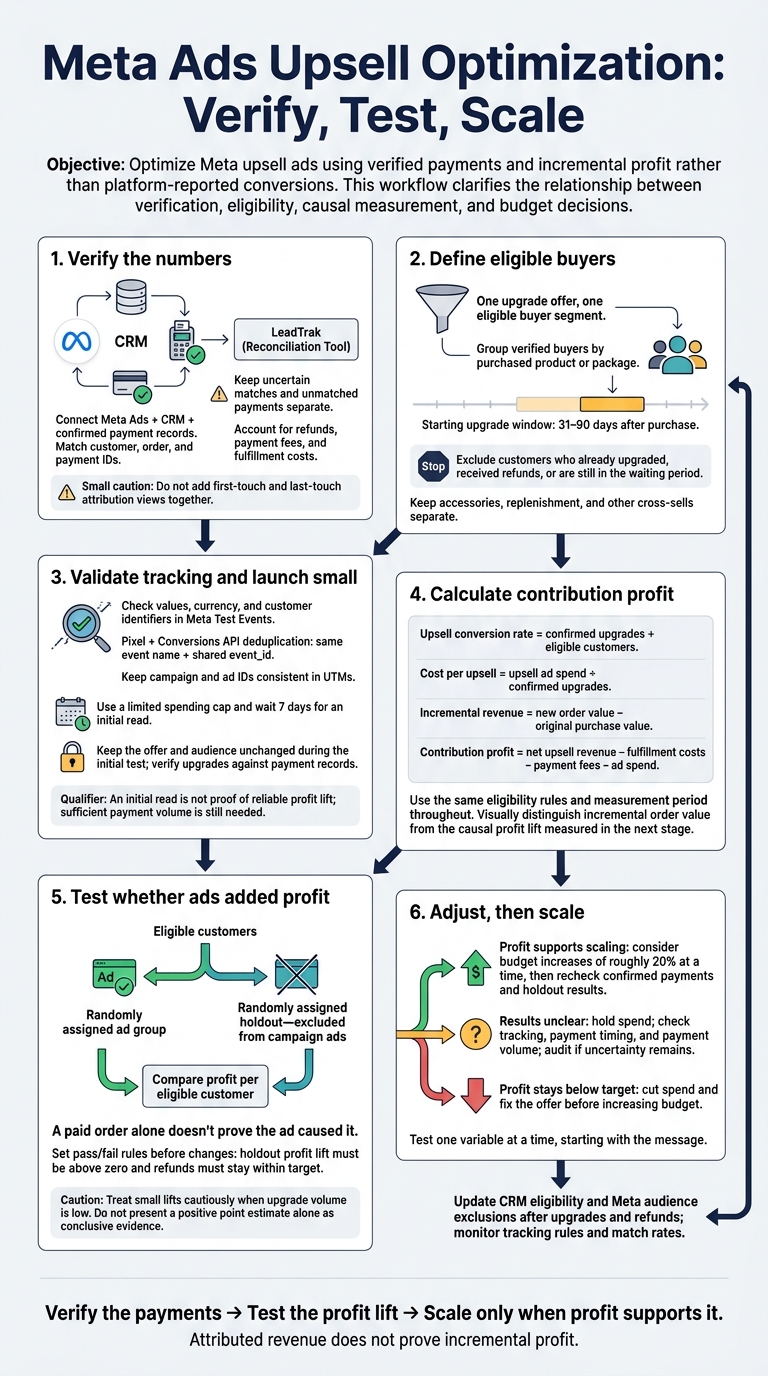
Meta Ads Upsell Optimization: Verify, Test, Scale
Step 1: Build Customer Segments and Launch Upsell Tests
Group Customers by Purchase History
Group verified buyers by the product or package they purchased so you can isolate upgrade revenue. Use customer lists or website activity to build Meta Custom Audiences.[3]
Start with an upgrade window of 31–90 days after purchase. Keep accessories, replenishment, and other cross-sells separate from upgrade tests.[3]
Match Upgrades to Eligible Customers
Give each segment one relevant higher-tier offer. Exclude customers who already bought that upgrade, those with refunds, and anyone still in the waiting period. Create separate custom audiences and ad sets for each buyer segment, and update exclusions when customer records change.[3]
Don't split your account into too many segments. Each test needs enough volume for Meta to learn.[4]
Check Tracking and Launch a Small Test
Open the Test Events tab in Meta Events Manager and check that values, currency, and customer identifiers come through correctly.[5]
When Pixel and Conversions API report the same purchase, use the same event name and shared event_id for deduplication.[5] Keep campaign and ad IDs consistent in your UTMs so you can match clicks to actual payment revenue.[2][5]
Set a limited spending cap and wait 7 days for an initial read. Keep the offer and audience unchanged, and verify each upgrade against the payment record before increasing spend. Use value optimization only if the account is eligible and has enough historical conversion volume.[4][5]
Once the test is clean, use the payment data to measure incremental profit in Step 2.
sbb-itb-db0d145
Step 2: Measure Paid Revenue and Incremental Profit
Once the test is live, use confirmed payments to separate attributed revenue from profit. The goal is to measure what the upsell actually added, not just what the ad platform reports.
Reconcile Meta, CRM, and Payment Reports
Match customer, order, and payment IDs across all three sources. Use LeadTrak to review revenue and check first-touch and last-touch sources. Don’t add those attribution views together. Keep unmatched payments separate until you confirm the customer/source match.
Review results at the ad level. If there isn’t enough volume for reliable analysis, roll them up to ad sets and campaigns.
| Metric | Meta Ads | CRM | Confirmed payment records |
|---|---|---|---|
| Purchase count | Attributed purchases | Recorded orders or deals | Successful payments |
| Revenue | Tracked event values | Recorded sales value | Collected payments, reconciled with refunds and fees |
| Attribution basis | Click/view window | Stored source or touch history | Only linked customer/source records |
| Refunds | May not appear | If recorded or synced | Refunds and adjustments |
| Cost inputs | Ad spend | Fulfillment costs, if recorded | Processing fees; fulfillment costs if joined |
| Unmatched revenue | No complete cash reconciliation | May lack source information | Keep separate until matched |
Different totals don’t mean tracking is broken. Meta reports attributed revenue, the CRM records sales activity, and payment records confirm cash collected. [2]
With the numbers reconciled, calculate the profit from those confirmed upgrades.
Calculate Upsell Costs and Contribution Profit
Count only incremental order value, and use the same eligibility rules and measurement period throughout:
- Upsell conversion rate = confirmed upgrades ÷ eligible customers.
- Cost per upsell = upsell ad spend ÷ confirmed upgrades.
- Incremental revenue = new order value − original purchase value. [6]
- Contribution profit = net upsell revenue − fulfillment costs − payment fees − ad spend. [1]
Use this profit baseline to compare the campaign with a holdout group.
Estimate Profit Lift With a Holdout Group
Randomly split eligible customers into an ad group and a holdout group excluded from the campaign. Then compare profit per eligible customer between the groups to estimate incremental profit. [1]
Treat small lifts cautiously when upgrade volume is low.
Step 3: Adjust Offers and Budgets Based on Profit
Once payment data confirms profit, use those results to guide your next changes.
Test Offers and Find Causes of Poor Results
Set pass/fail rules before changing the campaign: holdout profit lift must be above zero, and refunds must stay within target. Test one variable at a time, starting with the message. [5]
If profit looks weak, check tracking and payment timing before reworking the ad content. Wait for enough payment volume before changing the offer. Low-volume tests can’t give you a clear answer. [5]
If the test fails, fix the offer before increasing spend.
Scale Budgets and Update Customer Records
Scale only when incremental profit supports it, not just because Meta ROAS looks good. Consider budget increases of roughly 20% at a time. Then check whether confirmed payments and holdout results show added profit. Hold spend when results are unclear, and cut it when profit stays below target. [1][5]
After upgrades and refunds, update CRM eligibility and Meta audience exclusions. [3] Use LeadTrak to check for changes in tracking rules or match rates. Confirm that the revenue change reflects actual payments, not a tracking shift.
If the numbers still don’t explain the result, audit the account before making bigger changes.
Get Help With Complex Meta Ads Accounts
If tracking, audience overlap, or profit signals remain unclear, Dancing Chicken can audit the account and pinpoint whether tracking, the offer, or ad content needs work.
Conclusion: Base Upsell Decisions on Verified Profit
Connect your Meta ads, CRM, and payment data with LeadTrak. Separate confirmed matches from possible matches so you can see which revenue is verified.
Start with one upgrade and one eligible segment. Then use historical data to set a contribution-profit target.
Attributed revenue does not prove incremental profit. [2] Use a holdout group to test whether the offer generates profit beyond purchases customers would have made anyway. Set your offer and budget based on that lift - not ad-attributed revenue.
FAQs
How many customers do I need for a reliable holdout test?
The provided information doesn’t specify how many customers you need for a reliable holdout test.
For upsell tracking, use separate custom events to avoid counting conversions twice. Set Meta’s Value Optimization goal to “maximize value of conversions,” and use order-level profit or lifetime value instead of revenue alone.
Check reported ROAS against your CRM or payment records so your budget decisions don’t rely solely on platform-reported results.
How should I account for delayed upgrades and refunds?
Track the original purchase as a standard event, then record delayed upgrades as separate Upsell Purchase events. Count only the added value of each upgrade so you don’t count the same revenue twice.
Check Meta Ads reporting against backend revenue so your budget decisions account for both upgrades and refunds. LeadTrak connects your ad accounts, CRM, and payment processors to link revenue to specific ads, helping you optimize for actual profit and customer lifetime value.
How can LeadTrak help investigate unmatched payments?
LeadTrak marks payments it can’t trace as “No lead found” instead of assigning them to Direct or an ad. That keeps confirmed revenue separate from payments that need a closer look.
Possible matches stay separate from confirmed links. Each includes a reason and can be undone, so you can review uncertain connections without treating them as proven attribution.